Perfect
LXC | Monitoring Zabbix
Debian LXC (Debian GNU/Linux 8 (jessie))
Disk 25GB
RAM 2 GB
| Remove Zabbix Client | apt purge --auto-remove zabbix-agent |
| # wget http://repo.zabbix.com/zabbix/3.0/debian/pool/main/z/zabbix-release/zabbix-release_3.0-1+jessie_all.deb # dpkg -i zabbix-release_3.0-1+trusty_all.deb # apt-get update |
| # apt-get install zabbix-server-mysql zabbix-frontend-php |
| # cd /usr/share/doc/zabbix-server-mysql # zcat create.sql.gz | mysql -uroot zabbix |
| # vi /etc/zabbix/zabbix_server.conf DBHost=localhost DBName=zabbix DBUser=zabbix DBPassword=zabbix |
| # service zabbix-server start |
| # vi /etc/apache2/conf-enabled/zabbix.conf |
| php_value max_execution_time 300 php_value memory_limit 128M php_value post_max_size 16M php_value upload_max_filesize 2M php_value max_input_time 300 php_value always_populate_raw_post_data -1 # php_value date.timezone Europe/Zurich |
| # service apache2 restart |
MONITOR JOOMLA FRONTEND LOGIN WITH ZABBIX
Source/Quellen:
- https://www.zabbix.com/documentation/3.2/manual/installation/install_from_packages
- http://www.zabbix.com/- http://lab4.org/wiki/Zabbix_Webfrontend_installieren
- https://www.phyramid.com/en/blog/monitoring-servers-at-phyramid/
- http://php.net/manual/de/timezones.europe.php
Add a comment
LXC | CUPS PrintServer
Install the cups, ghostscript, and gsfonts packages.
Source/Quellen:
- www.openprinting.org/printers
- wiki.debian.org/SystemPrinting
- fosskb.in/2012/12/31/printer-sharing-using-cups/
- lifeonubuntu.com/setting-up-cups-and-installing-local-printer-in-ubuntu-server/
- wiki.archlinux.org/index.php/CUPS
- www.cups.org/
- www.makeuseof.com/tag/make-wireless-printer-raspberry-pi/
- wiki.samba.org/index.php/Setup_a_Samba_print_server
-
-
-
-
-
- Add a comment
VM (Absolute minimum, you may need to scale-up as usage increases)
1 x vCPU
1024 MB RAM
10 GB HDD Storage
apt install -y freeradius |
|||
vi /etc/freeradius/3.0/clients.conf |
|||
| vi /etc/freeradius/3.0/users | |||
| some changes to the log (start around line 257) i did change so i know all loged user | |||
| vi /etc/freeradius/3.0/radiusd.conf | |||
| 352 auth_badpass = yes 353 auth_goodpass = yes |
|||
| # systemctl status freeradius.service | |||
| # systemctl stop freeradius.service | |||
| # systemctl start freeradius.service | |||
| # systemctl restart freeradius.service | |||
| # journalctl -xe | |||
| # freeradius -v | |||
| radiusd: FreeRADIUS Version 3.0.12, for host x86_64-pc-linux-gnu, built on Aug 10 2017 at 07:05:06 FreeRADIUS Version 3.0.12 |
|||
| # multitail /var/log/freeradius/radius.log |
| adding a second client | Process: 722 ExecStartPre=/usr/sbin/freeradius $FREERADIUS_OPTIONS -Cxm -lstdout (code=exited, status=1/FAILURE) Aug 22 07:13:33 radius-01 systemd[1]: freeradius.service: Control process exited, code=exited status=1 Aug 22 07:13:33 radius-01 systemd[1]: Failed to start FreeRADIUS multi-protocol policy server. Aug 22 07:13:33 radius-01 systemd[1]: freeradius.service: Unit entered failed state. Aug 22 07:13:33 radius-01 systemd[1]: freeradius.service: Failed with result 'exit-code'. |
Stackoverflow |
---
Quellen/Source:
Add a comment
KVM mit PXE / DHCP / TFTP
TFTP (tftpd-hpa)
| apt install tftpd-hpa |
ich musste unter
| vi /etc/inetd.conf |
den tftp auskomentieren # weil sonst der Port UDP/69 blockiert war
DHCP
vi /etc/dhcp/dhcpd.conf |
| cat /var/lib/dhcp/dhcpd.leases |
service isc-dhcp-server restart
service isc-dhcp-server start
service isc-dhcp-server stop
shows the used IP
grep "^lease" /var/lib/dhcp/dhcpd.leases |sort |uniq |wc -l
or
egrep "lease|hostname|hardware|\}" /var/lib/dhcp/dhcpd.leases
or
dhcp-lease-list /var/lib/dhcp/dhcpd.leases
PXE
Quellen/Source:
- www.debian-administration.org
- gparted.org over PXE
- isc-dhcp-server
-
-
-
-
-
wiki.debian.org/BOINC
boinc.berkeley.edu/wiki/Installing_BOINC_on_Debian#Links
# apt install boinc-client
# apt install boinc-manager
for CLI installation, run
# boinccmd
IRC: #debian-boinc on irc.debian.org
munin: https://github.com/munin-monitoring/contrib/tree/master/plugins/boinc
boincstats.com/en/bam/boincstatsSettings/

to use a bit of CPU do - KVM mit BOINC
the Goal is to reach a KVM Server with IPv6
Add a commentKVM with Graylog
Memory: 4GB
Hard Disk: 250GB
IOS: Debian 9
Hostname graylog-01
IP 10.147.42.40
build a homepage for photographer (CMS, Foto)
Quellen / Source:
- lychee
- koken works nice with Lightroom
- zenphoto
- piwigo
- galleryproject but closed sinc 2014
- Coppermine Photo Gallery
- 4homepages
- format.com $$$
-
-
-
Desktop Software
- lightzoneproject.org
- rawtherapee.com
- Capture One
- darktable.org
-
-
-
Add a comment
| Debian 9 (Stretch) , Installation on a Proxmox KVM Server | Debian 8 on a LXC Contaner |
|
just select apt install -y vim-nox To enable SSH login for a root user on Debian Linux system you need to first configure SSH server. Open /etc/ssh/sshd_config and change the following line: remove the #
|
first with nano /etc/ssh/sshd_config
# reboot
an Login with Traterm |
|
# apt full-upgrade # apt update -y && apt upgrade -y && apt autoremove # apt install vim-nox -y echo set number >> ~/.vimrc echo syntax on >> ~/.vimrc dpkg-reconfigure tzdata echo This email address is being protected from spambots. You need JavaScript enabled to view it. >> ~/.forward |
|
| vi /etc/network/interfaces auto eth0 iface eth0 inet static address 10.147.42.70 netmask 255.255.255.0 gateway 10.147.42.1 |
die IP Adresse wir im Proxmox GUI direkt bei der Herstellung des LXC angegeben | |
| sudo apt-get install debsecan | ||
| man debsecan | man Page | |
| 'pkg audit -F' | for freebsd |
Once you made the above change restart your SSH server:
# /etc/init.d/ssh restart
[ ok ] Restarting ssh (via systemctl): ssh.service.
Add then Munin-Node and Munin-Plugin
und ein Paar Tools für Analysen oder Messen der Auslastung
| iftop – Network Bandwidth Monitoring | apt-get install iftop | iftop |
| IPTraf– Real Time IP LAN Monitoring | apt-get install iptraf | iptraf |
| Htop– Linux Process Monitoring | apt-get install htop | htop |
-
-
-
-
Add a comment
LXC | openLdap with GOsa2
Debian 8
RAM 1GB
HD 25GB
Infos GOsa2: oss.gonicus.de/
Infos openLDAP: www.openldap.org/
Proxmox KVM openBSD pfSense NAT
Proxmox Version: proxmox-ve-2.6.32: 3.3-143 (running kernel: 2.6.32-35-pve)
Pfsense Version: 2.2
First Download the file and unzip it to get the ISO file
Upload the file to your Proxmox Server
In Proxmox Create a VM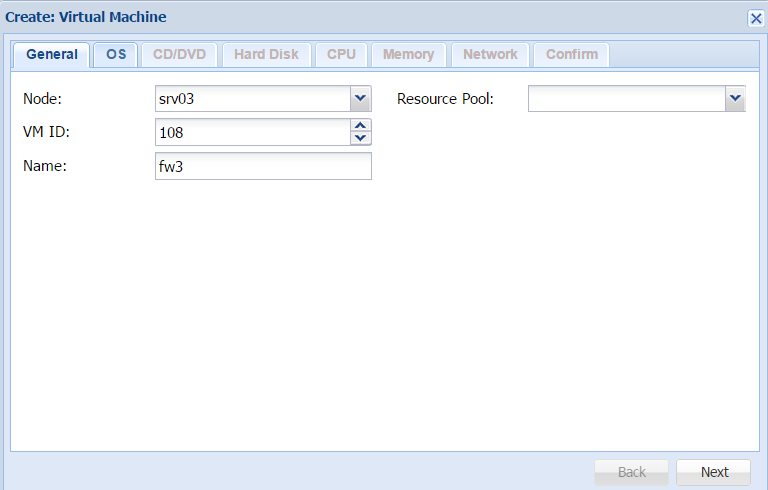
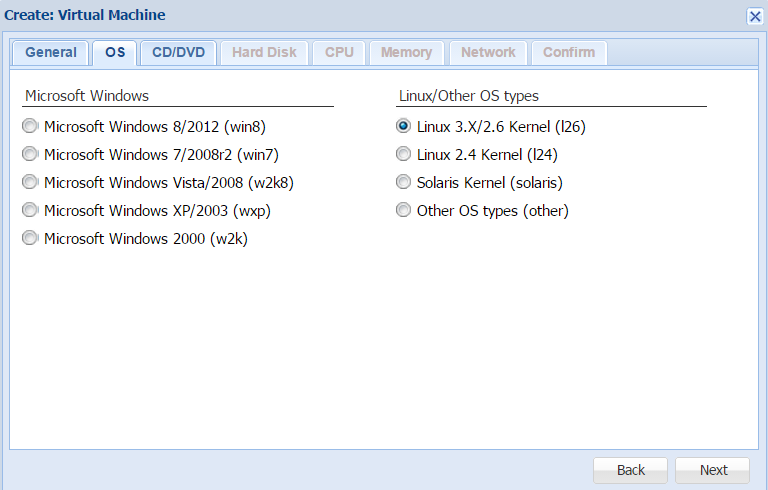
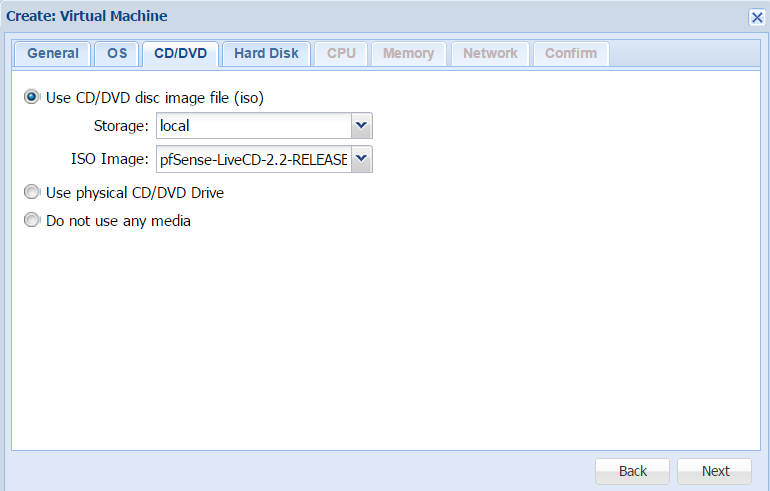
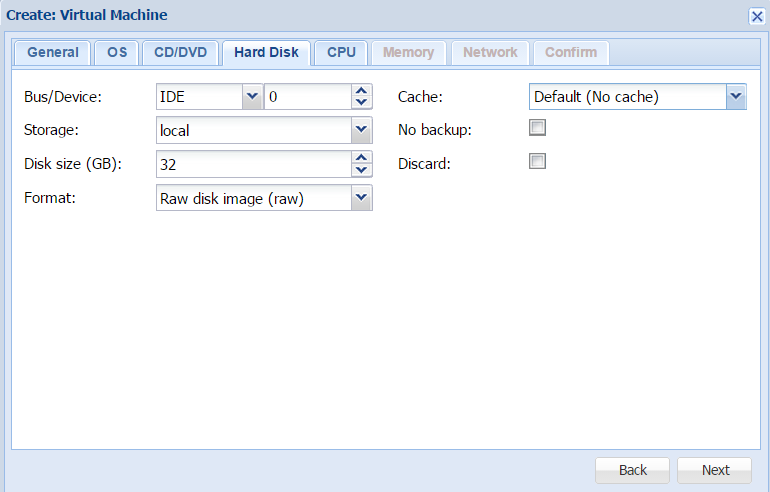
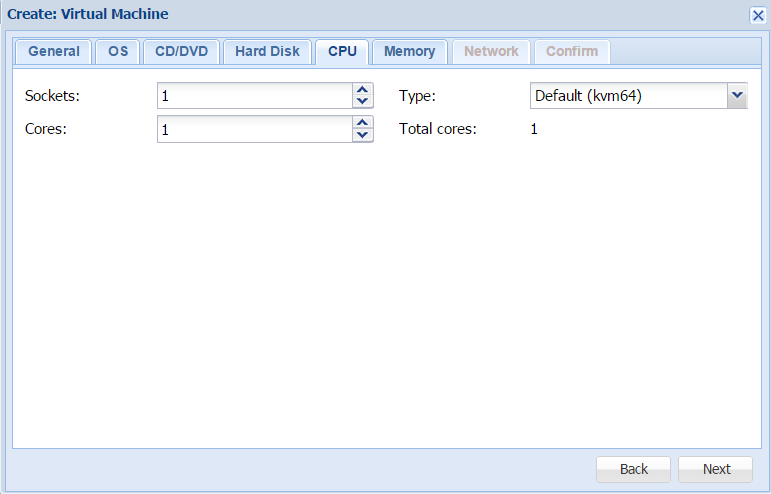
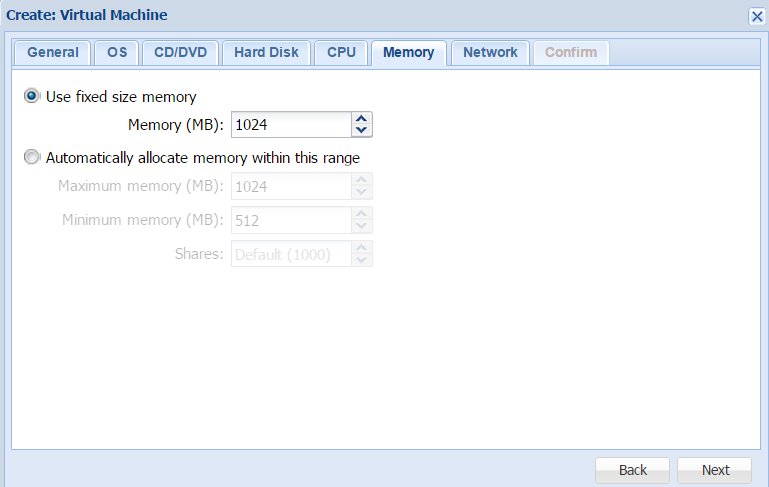
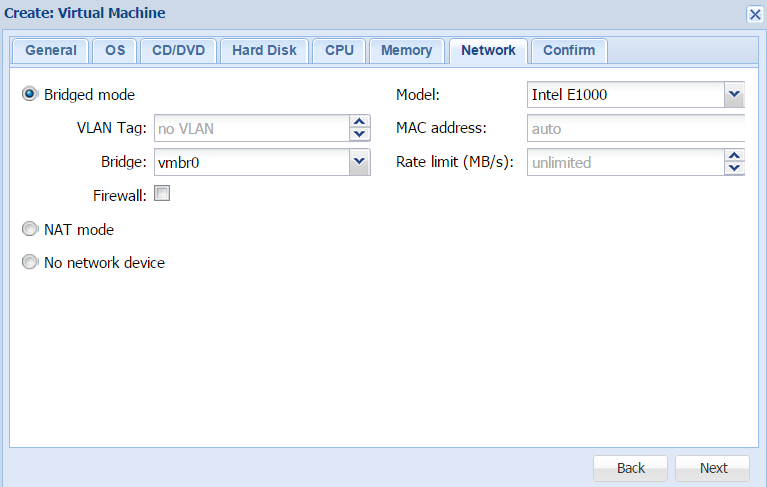
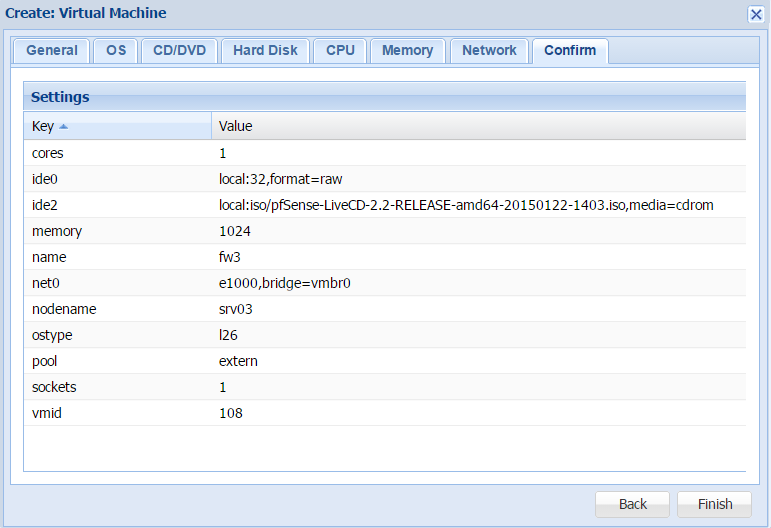
Important before you start the Virtual Server you have to add a second Network which you have defined before in Proxmox Network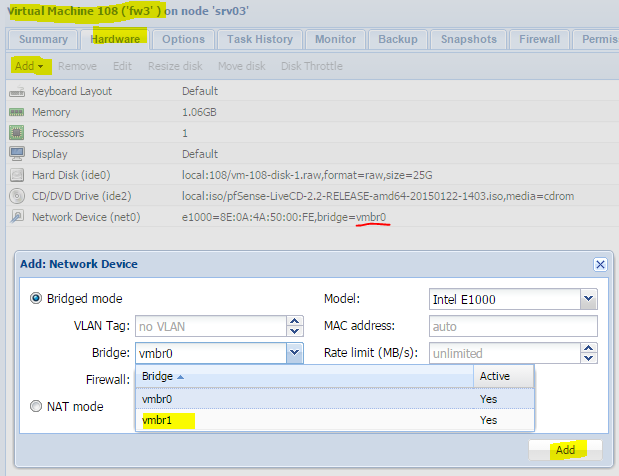
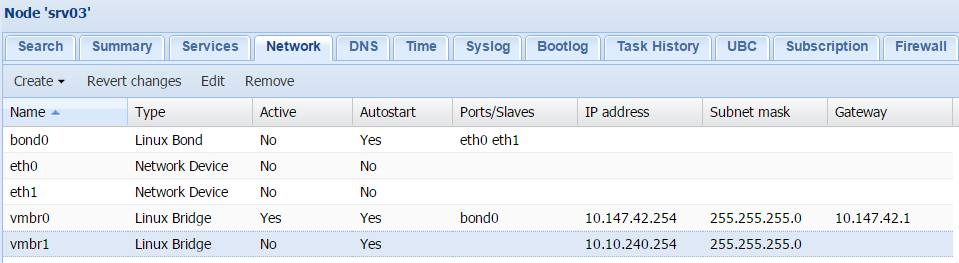
Proxmox KVM Server
Win 8 update auf Win 8.1
2GB - 4GB RAM (2048/4096MB)
126 GB Harddisk space
virtio-win-0.1-94.iso Download
wie wurde Installiert? Gemäss Doku
ab und zu gibt es errors
| BAD_POOL_HEADER | ||
| MEMORY_MANAGEMENT | ||
| and someting wiht sql ? |
Subcategories
Monitoring Article Count: 69
Roundcube Article Count: 1
 Roundcube ist eine freie Software für Webmail über IMAP, die in den Programmiersprachen PHP und JavaScript entwickelt wird. Roundcubes prominenteste Features sind die schlanke und moderne Benutzeroberfläche und die ausgeprägte Nutzung der Ajax-Technologie, die einen ähnlichen Bedien-Komfort wie bei einer lokal installierten Anwendung ermöglicht.
 Kolab News Article Count: 33
soho Net Article Count: 4
Perfect NAS Article Count: 28
Perfect Server Article Count: 80
Perfect Router/FW/Switch Article Count: 4
- Anker 575 USB-C Docking Station (13-in-1), 85W für Laptops
- Perfect Server Hardware for Virtualization | Proxmox | pve-05
- Pioneer Blu-Ray/BD/DVD/CD Reader/writer USB 3.0 BDR-XD07TB | WORKS OK with Debian 11
- NOT WORKING WITH DEBIAN 11 | Dockingstation | IcyBox 14-in-1 USB Type-C | IB-DK2262AC
- How to remove systemd services
- Laptop | Lenovo | Thinkpad E15 Gen3 AMD
- Laptop | Lenovo | LENOVO-IDEA IdeaPad 3 15IGL05 Notebook (15.6 ", 128 GB SSD, Business Black)
- D. Klimo | Kent monoblocks
- TTN Mapper
- LILYGO TTGO T-Beam V1.1 ESP32 LoRa 868Mhz GPS 18650 Board
- LILYGO® TTGO T-Beam 868MHz -> The Things Network (TTN/TTS) -> Karte | Infos und Video bei Alex (www.aeq-web.com)
- Kabelfarben 3.3V, 5V, 12V, 230V | Durchmesser
- 01 Digi-Bee Stand01 Wetter
- Solar Panel | 6V 3W Solar Panel JY D145x145
- TTGO LoRa32 V2.1_1.6 version 433/868/915Mhz ESP32 LoRa OLED 0.96 Inch SD Card Bluetooth WIFI wireless Module ESP-32 SMA
- -pve-04 | Disk SSD and HDD
- DISK SSD | 1 TB | Samsung SSD 870 EVO 1TB - 1TB
- NanoVNA V2
- CubeSat | antennas |
- KoZo_GS3_433MHz
- tinyGS - shortcut what it means
- TinyGS Telegram community | published Links
- Wolfgang W. Osterhage (Springer Verlag Sachbuch 2021): Die Geschichte der Raumfahrt | (gefundene Fehler)
- ucs Univention some commands
- SMA-Stecker / SMA-Buchse
RSS Feed
Warning: Invalid argument supplied for foreach() in /var/www/clients/client2/web2/web/j/modules/mod_jw_srfr/helper.php on line 39
Warning: Invalid argument supplied for foreach() in /var/www/clients/client2/web2/web/j/modules/mod_jw_srfr/helper.php on line 39
-
Die Angst vor den Agenten
Die Angst vor den Agenten
Einer kürzlich durchgeführten Umfrage von Cisco zufolge, laufen in 85 Prozent aller Betriebe Pilotprojekte mit KI-Agenten, aber nur 5 Prozent der Unternehmen setzen sie produktiv ein.
Source: Linux-Magazin
Created on: 25.04.2026 | 12:58
Linux-Magazin | 25.04.2026 | 12:58 -
Was sonst noch unwichtig war in der Kalenderwoche 17/26
Was sonst noch unwichtig war in der Kalenderwoche 17/26
Fünf fabelhafte Fakten der Woche, die es irgendwie nicht zu einer Meldung auf Linux-Magazin Online geschafft haben – und warum eigentlich nicht.
Source: Linux-Magazin
Created on: 24.04.2026 | 21:54
Linux-Magazin | 24.04.2026 | 21:54 -
Continued Evolution of Persistence Mechanism Against Cisco Secure Firewall Adaptive Security Appliance and Secure Firewall Threat Defense
Continued Evolution of Persistence Mechanism Against Cisco Secure Firewall Adaptive Security Appliance and Secure Firewall Threat Defense
On April 23, 2026, the U.S. Cybersecurity and Infrastructure Security Agency (CISA) issued an update to V1: Emergency Directive (ED) 25-03: Identify and Mitigate Potential Compromise of Cisco Devices related to Cisco Secure Firewall Adaptive Security Appliance (ASA) and Cisco[…]
Source: Cisco Security Advisory
Created on: 24.04.2026 | 13:37
Cisco Security Advisory | 24.04.2026 | 13:37 -
Cisco ACI Multi-Site CloudSec Encryption Information Disclosure Vulnerability
Cisco ACI Multi-Site CloudSec Encryption Information Disclosure Vulnerability
A vulnerability in the Cisco ACI Multi-Site CloudSec encryption feature of Cisco Nexus 9000 Series Fabric Switches in ACI mode could allow an unauthenticated, remote attacker to read or modify intersite encrypted traffic. This vulnerability is due to an issue[…]
Source: Cisco Security Advisory
Created on: 24.04.2026 | 13:05
Cisco Security Advisory | 24.04.2026 | 13:05 -
Bug-Bounty-Programme ohne Geldprämien: Auch Nextcloud kapituliert vor KI
Bug-Bounty-Programme ohne Geldprämien: Auch Nextcloud kapituliert vor KI
 Bug-Bounty-Programme sollen IT-Forschern Einnahmen für die Meldung von Lücken ermöglichen. KI-Meldungen führen zur Abschaffung.
Source: heise security News
Created on: 24.04.2026 | 13:01
heise security News | 24.04.2026 | 13:01 -
Patch richtet fehlerhafte Zugriffskontrolle in HCL BigFix Service Management
Patch richtet fehlerhafte Zugriffskontrolle in HCL BigFix Service Management
 Angreifer können unbefugt auf HCL-BigFix-Service-Management-Instanzen zugreifen. Darüber können sie Systeme manipulieren.
Source: heise security News
Created on: 24.04.2026 | 09:46
heise security News | 24.04.2026 | 09:46 -
Patch richtet fehlerhafte Zugriffskontrolle in HCL BigFix Service Management
Patch richtet fehlerhafte Zugriffskontrolle in HCL BigFix Service Management
Angreifer können unbefugt auf HCL-BigFix-Service-Management-Instanzen zugreifen. Darüber können sie Systeme manipulieren.
Source: heise security Alerts
Created on: 24.04.2026 | 09:46
heise security Alerts | 24.04.2026 | 09:46 -
Passwortsafe Bitwarden: Kommandozeilen-Client trojanisiert
Passwortsafe Bitwarden: Kommandozeilen-Client trojanisiert
 Das Bitwarden-Security-Team bestätigt, dass kurzzeitig eine bösartige Version des Kommandozeilen-Client ausgeliefert wurde.
Source: heise security Alerts
Created on: 23.04.2026 | 18:58
heise security Alerts | 23.04.2026 | 18:58 -
New Archive CDN for End-of-Life (EOL) Releases
New Archive CDN for End-of-Life (EOL) Releases
Source: Announcements
Created on: 9.01.2026 | 18:43
Announcements | 9.01.2026 | 18:43 -
Proxmox Datacenter Manager 1.0 (stable)
Proxmox Datacenter Manager 1.0 (stable)
Source: Announcements
Created on: 4.12.2025 | 12:49
Announcements | 4.12.2025 | 12:49
neusten Links
Warning: count(): Parameter must be an array or an object that implements Countable in /var/www/clients/client2/web2/web/j/modules/mod_quicklistweblinks/helper.php on line 78
many More Links »
part of ...